
In-product messaging offers a scalable, effective way to deliver a personalized user experience and retain potential leads in your conversion funnel.
This is consistent with a recent State of Marketing report, where 93% of marketers reported that personalization helped convert more leads and encouraged clients to make purchases, driving sales.
In this guide, we’ll discuss everything about in-product messaging, including how to craft effective content and implement a winning strategy for your website.
What is In-Product Messaging?
In-product messaging refers to contextual notifications sent to users while they are interacting with your product, i.e., an app, software, or website.
The feature boosts a platform’s user experience by providing essential information when visitors need it, without disrupting their workflows or journeys.
For example, suppose a user is setting up their account on your SaaS product. You can display a pop-up with onboarding tips to help them personalize their accounts, without redirecting them to another page or interface.
In-Product Messaging vs. Push Notifications
Understanding the difference between in-product messaging and push notifications is the first step to using each format appropriately to engage your target audience and guide them to your conversion funnel.
The table below provides a side-by-side comparison of in-product messaging vs. push notifications:
| In-Product Messaging | Push Notifications | |
| Purpose | Provide contextual information for users as they interact with a product to highlight key features or improve their experience. | Send messages to users outside the product to re-engage them and invite them back to the platform. |
| Audience | Only users who are actively using your product at the time of sending the messages | All users who consented to the push notifications, regardless of what they are doing at the time of dispatching the messages |
| Timing | Messages appear contextually and in real-time | Messages are often scheduled and independent of whether users intend to reopen the app in the future |
| Personalization | Messages are highly specific to each user’s actions when interacting with your product | Most push notifications are generic, as the same message is sent to the audience pool |
| Performance | Effective for engaging leads while they are already on your platform to boost conversions and improve their user experience | Best suited for re-engaging customers and inviting them to return to your product/app |
In-product messaging allows you to engage users while they are on your app and provide useful information, encouraging them to stay on your website and platform longer.
Critical Elements of an In-Product Messaging Strategy
Random in-product messages scattered across your website clutter your web pages, which could hurt the UX and visitor engagement. Proper execution requires determining who sees which message and when, to maximize user engagement.
The best in-product messaging strategies share the following characteristics:
- Clear Engagement Objectives: The strategy should outline what you hope to achieve with the messages and how they support the broader business goals. For example, your objective could be to increase trial-to-paid conversions by 30% over 12 months.
- Audience Segmentation: The best strategies group users based on shared attributes, such as where they are in the life cycle or their engagement behaviors. For example, new users need product orientation, while repeat users want to learn about new or improved features.
- Message Sequences: The strategy should outline how the in-product messages will be displayed progressively, as users spend more time on your platform. For example, the first session messages may focus on account setup, followed by core feature introductions in the second one, and integrations in the third, as users continue to learn your product.
- Performance Assessment: The strategy should define what success looks like based on the outlined goals. This includes a clear assessment framework to determine which in-product messages are effective and which ones aren’t to get insights for refining your strategy to maximize visitor engagement.
How to Build a Product Messaging Strategy From Scratch
A well-designed product messaging strategy uses all the core elements and helps you engage website visitors at various points of their user journeys.
Here’s a simple guide on how to do it:
- Define Business Goals: Outline the SMART (specific, measurable, achievable, relevant, time-bound) engagement goals you hope to achieve with the in-product messages. An example would be to reduce onboarding time for an SaaS product from 5 days to 2 days within the next 6 months.
- Segment Your Audience: Group product users based on their shared attributes, such as lifecycle stage, behavior patterns, and role, for proper targeting and message personalization.
- Identify Critical Messaging Moments: Map user journeys, highlighting specific touchpoints where they might benefit most from additional information. Also, identify friction points that may cause users to drop off, especially due to a lack of adequate information.
- Establish Effective Messaging Mechanisms: Identify the best-fit messaging formats and targeting techniques for maximum user engagement. For example, you could use tooltips to provide additional context when users hover over a feature and an announcement tool to display exclusive time offers to reduce cart abandonment.
- Craft Engaging Messages: Write concise messages that convey the intended message clearly and include contextual CTAs to nudge users to take the desired actions.
- Implement and Monitor: Roll out the messaging and track essential indicators, such as impressions, engagement rates, and downstream behaviors, to determine whether the strategy meets the intended goals.

How to Implement In-Product Messaging on Your Website
The best way to add in-product messaging to your website is to use a widget or plugin. A no-code widget lets you set up and customize the messages without requiring any technical skills.
Webynize offers user-friendly tools to integrate in-product messaging into your website and engage visitors throughout their journey.
The tools include:
- Social Proof Widget: Add a social proof widget to your website and showcase other customers’ activity to provide first-time visitors with invaluable reassurance. For example, you could display the number of shoppers who have just checked out their carts to nudge potential leads to make their purchase decisions while on your website.
- Tooltips Widget: Add a tooltips widget to provide on-demand support for visitors who don’t know how to access some features or navigate your website.
- Announcement Widget: Add an announcement widget to highlight important news, such as new features, upcoming events, or limited-time offers, to grab visitors’ attention when they open your website.
Here’s a simple guide to integrate these widgets into your site:
- Sign up for Webynize and enjoy a 7-day free trial.

- Click on the +Create Widget button in the top right corner to open our widget library.
- Select the in-product messaging tool you prefer from the drop-down menu, including the announcement, social proof, or tooltips widgets.

- Provide a custom name for the widget and click Next to go to the editor panel.
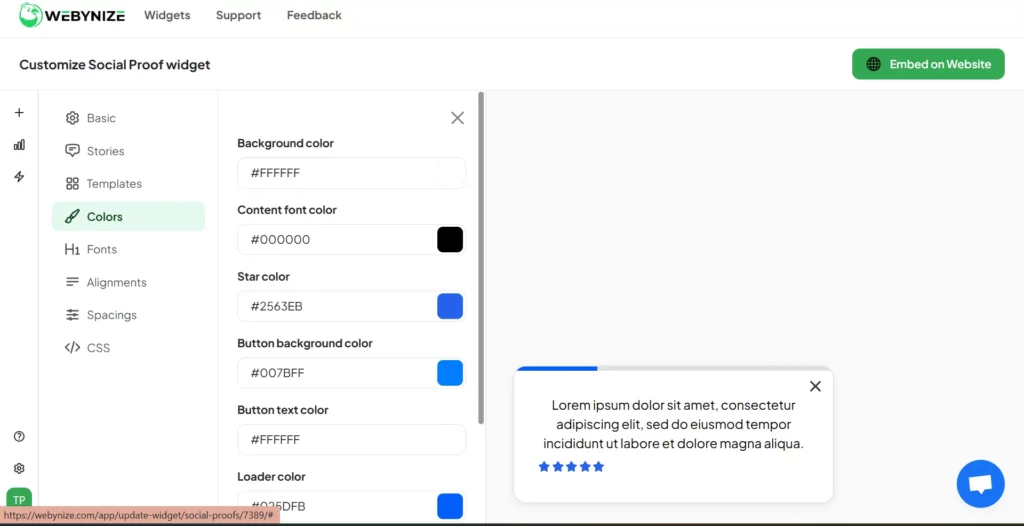
- Craft the in-product messages you want to display to your website visitors and save the drafts. Here’s an example for the social proof widget:

- Style the widget to your preferred background color and font settings to complement your website theme.
- Click Embed on Website and select your web builder.

- Copy the embed script that displays on the pop-up.
- Log in to your website dashboard and open the web page(s) where you want to display the in-product messages.

- Open the code editor, code block section, or the rich text editor, depending on your website platform. Here’s how it looks for WordPress users:

- Paste the embed code you generated using our Webynize widget(s).
- Save the changes and publish the web page.
The in-product messaging feature should be live on your website.
Create a widget and join small businesses, marketers, and e-commerce sites using our in-product messaging tools to boost visitor engagement and drive conversions.
Best Practices for Writing In-Product Messaging Copy
Displaying in-product messaging is the second part of the user engagement strategy. The first step is usually to draft messages that grab users’ attention quickly and keep them engaged with your product.
Here are some tips to keep in mind:
- Align with User Intent: Craft messages that match what users are trying to accomplish at that exact moment. For example, if a user creates a new project, the message could be about how they can access pre-built templates to speed up the process.
- Be Concise: Use single sentences and lists where possible to make the in-product message easily scannable.
- Use Simple Language: Avoid technical jargon or buzzwords, as these could be confusing for the average user with limited industry knowledge. Instead, write for a general audience, so that the messages are easy to understand and follow.
- Test and Refine: Use A/B testing to determine which message formats resonate best with your audience, and refine your content based on the feedback.
- Include Relevant CTAs: The in-product message should include a call to action that provides clear next steps for the users to act and stay within the product.

Frequently Asked Questions (FAQs)
This section answers common questions people ask about in-product messaging:
Can In-Product Messaging Replace Onboarding Emails?
Yes. In-product messaging can replace onboarding emails by guiding users as they actively set up their accounts or profiles, thereby increasing completion rates.
What Triggers Work Best for In-App Messages?
The best triggers for in-app messages are user behaviors and contextual moments. For example, you could display a welcome message when users open your product for the first time.
Additionally, you could send behavioral messages when users abruptly stop their journey or spend too much time without scrolling.
How to Prevent Message Fatigue?
The best way to prevent message fatigue is by keeping the messages concise and limiting the number of notifications a user receives per visit.
This helps keep users engaged without overwhelming them, which could cause them to drop off.
Conclusion
The best way to maximize lead conversion is by engaging the prospective clients when they are already on your website. However, you must deliver the messages tactfully so as not to disrupt visitors’ browsing experience.
Webynize offers several solutions, like announcement, social proof, and tooltips widgets, for displaying contextual in-product messages as visitors move through your conversion funnel. The widgets use simple embed codes and are easy to install, even without advanced web design skills, making them beginner-friendly.
Additionally, our widgets have a responsive design that adjusts to different screen sizes, allowing you to display in-product messages even on mobile devices.
Sign up for Webynize and display engaging, personalized in-product messages to drive conversions on your website.


