Divi is among the best WordPress website builders in the market. Its drag-and-drop feature makes it beginner-friendly, but it also offers advanced capabilities such as deep design customization and an Inspector tool, catering to seasoned site builders who want granular control over the web design process.
However, like other web builders, Divi offers only basic widgets for elementary functions like scroll buttons and forms, prompting users and web developers to rely on third-party plugins for more flexible customization options.
In this guide, we’ll cover the must-have Divi widgets to add new features and functionality to your website without writing any code.
TL;DR – Must Have Divi Widgets
Here’s a quick rundown of the most essential Divi widgets to add to your website:
- Social Proof
- Vote Button
- Cookie Consent
- Cancellation Form
- FAQ
- Announcement
- Featured Articles
- Pricing Table
- Booking
- Back-to-top button
Keep reading for an in-depth review of each widget, including how it impacts your website’s functionality and user experience.
Why Divi Widgets Matter For Website Design?
Divi widgets help you build a visually appealing, yet functional website that drives visitor engagement for your website and complements your conversion funnel.
Some of the reasons why Divi widgets matter in website design include:
- No-Code Customization: You can set up and customize your Divi widgets without writing any code, making them accessible to users without advanced technical skills.
- Improve Conversion Rates: Divi widgets, such as testimonials and announcements plugins, help you display social proof, encouraging potential clients to trust your website or brand, hence ordering your products or signing up for your newsletters.
- Convenience: It takes a few minutes to customize a Divi widget and add it to your website, which allows you to scale your site’s features quickly to meet changing demand.
- Enhancing User Experiences: Divi widgets ease visitors’ navigation through your site, encouraging them to stay on your website longer. For example, a table of contents plugin allows visitors to go back and forth through sections, enhancing navigation.
- Improve Your Website’s Mobile Responsiveness: Divi widgets use a mobile-first design, which lets them auto-adjust to different screen sizes. This gives visitors a consistent UX regardless of the device they use to access your website.
How to Add Divi Widgets To Any Page
Adding Divi widgets to a website is straightforward and should only take a few minutes to complete the setup process. Webynize offers no-code widgets that let you create and customize your Divi plugins without writing any code.
This section provides a simple guide to creating Divi widgets with Webynize and adding them to your website.
Creating a Divi Widget on Webynize
Follow these steps to create a Divi widget on Webynize:
- Log in or sign up for Webynize to unlock a 7-day unlimited access to our Divi widgets.
- Click the +Create Widget button to access our library of Divi plugins.
- Open the dropdown menu and choose the Divi widget you need.
- Input a name for the widget and click Next to go to the widget customization dashboard.
- Personalize the widget to blend with your brand theme by setting your preferred background color, font settings, and layout.
- Click Embed on Website and select Divi as your web builder type.
- Copy the generated JavaScript embed code that appears on the screen.
Adding Divi Widgets to Your Website
Next, let’s discuss how to add Divi widgets to your website:
- Log in to your WordPress workspace.
- On the panel on the left-hand side of your screen under Pages, choose whether to edit an existing page or create a new one.
- Add a new row on the web page by clicking the + icon at the top of the page.
- In the options that pop up, choose the row layout that you prefer for your widget and select the Code module.
- Paste the embed code you copied from Webynize.
- Save the changes and publish the web page.
List of Divi Widgets That Improve Your Website UX
Improving your website’s UX offers the best way to boost visitor engagement and increase conversions.
We have compiled a list of the top-10 Divi widgets you should start with:
1. Social Proof
Embed a Social Proof widget to display real-time updates on other visitors’ activities, such as purchase notifications, reviews, and visitor numbers. This helps gain new visitors’ trust quickly, encouraging them to stay on your website longer.
It also helps reduce visitors’ decision-making anxiety when they see that other customers have bought your products or submitted positive reviews.
2. Vote Button
A Vote Button widget helps you set up polls, star rating systems, and upvotes or downvotes, allowing visitors to share their experience with a product or service.
This shows website visitors that their feedback matters, which lays the foundation for a long-term relationship with the brand.
3. Cookie Consent
Include a Cookie Consent widget to highlight the type of data you collect and how you use it, such as to personalize visitors’ browsing experience or monitor website performance. This improves UX by giving site visitors control over the personal data they share with your site.
The widget also remembers a visitor’s preferences, meaning they do not have to give or deny consent every time they visit the site.
4. Cancellation Form
A Cancellation Form widget provides clear pathways through which your site users can opt out of subscriptions, memberships, reservations, and event registrations.
They improve UX by turning a process that is potentially frustrating and vague into a straightforward process, reinforcing your brand’s credibility and transparency.
5. FAQ
Use an FAQ Widget to provide answers to common queries people ask about your products, so they don’t have to overwhelm your support team with tickets.
A well-optimized FAQ widget includes links to relevant web pages that visitors may follow for additional information on their question(s).
6. Announcement
Add an Announcement Widget to highlight important news, offers, or events, and grab visitors’ attention quickly when they visit your website.
For example, an announcement on limited-time offers creates FOMO among potential buyers, nudging them to make their purchase decision while still on your website.
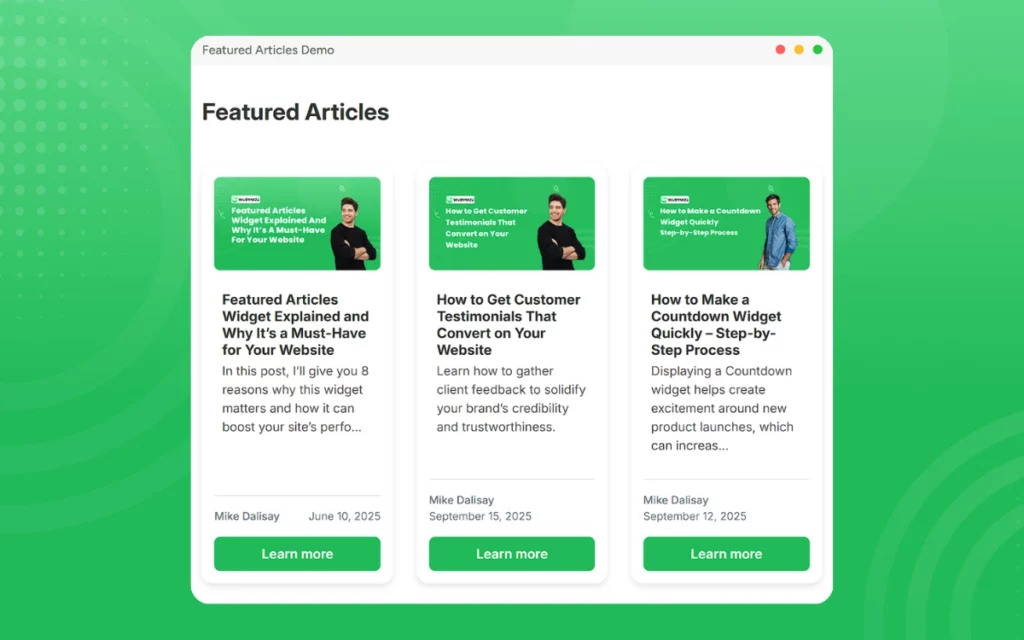
7. Featured Articles
Any website with a blog section should include a Featured Articles Widget highlighting its top content or recently published news that would be of interest to visitors.
This allows website visitors to skim through the topics quickly and open the ones that align with their content interests or information needs.
8. Pricing Table
A Pricing Table widget provides site visitors with easy-to-compare products and services, which significantly reduces confusion and supports decision-making.
You could even include categories like “Most Popular” and “Recommended,” highlighting products that offer the best value for money, boosting conversions.
9. Booking
Add a Booking Widget to your website to streamline how site visitors make reservations or appointments, without needing to call your front desk office.
A booking widget also means clients can make reservations even when you are out of the office and receive real-time confirmation, enhancing your website’s UX and conversion rate.
10. Back-to-top Button
A Back-to-Top Button Widget may seem basic, but it has a significant impact on your website’s UX.
First, it allows visitors to quickly scroll back to the top, reducing bounce rate. Additionally, it enhances your website’s accessibility by catering to visitors with limited mobility.
These Divi widgets help transform your platform from just another website into a conversion powerhouse. However, you need to find the right widget provider whose plugins are compatible with Divi and optimized for performance.
Developed by seasoned developers behind SociableKIT, Webynize offers Divi widgets with simple embed codes for easy implementation. Additionally, our widgets are mobile-optimized for seamless performance across devices, giving visitors a consistent UX.
Create a widget today and add the Divi plugins you need to enhance your website’s UX and boost visitor engagement.
Tips To Keep Your Divi Website Organized
Widgets help enhance your Divi website’s features and functionality, but without organization, they may clutter your web pages, hurting your site’s UX.
Here’s how to keep widget implementation clean, consistent, and scalable on your Divi website:
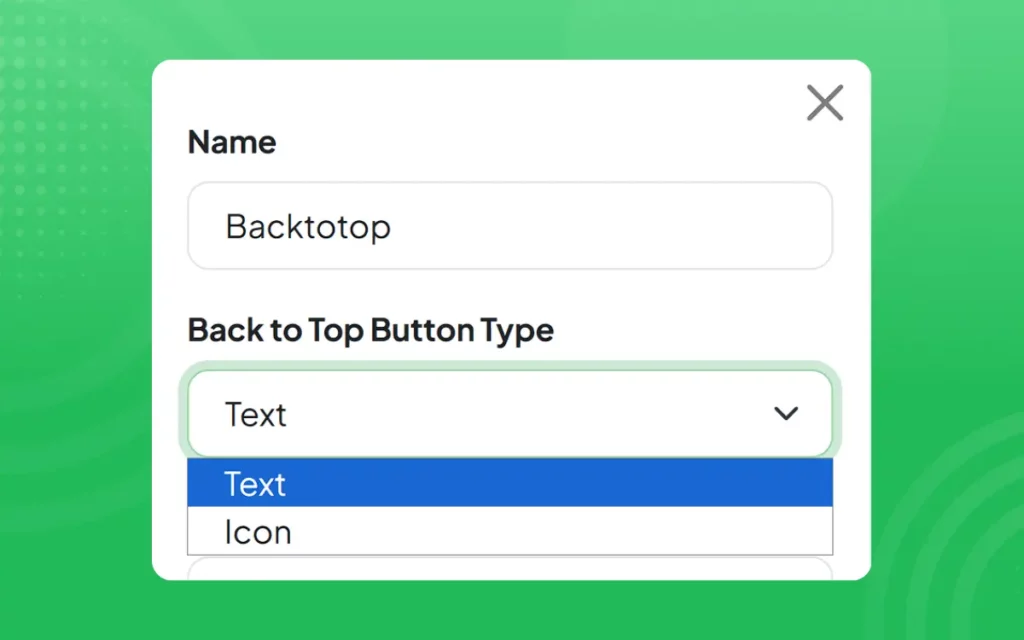
- Use Strict Naming Conventions: Use standard names/initials for each widget, so that they are easy to locate. For example, you could use BTTB_Widget as a name for your back-to-top button plugin.
- Disable Unused Widgets: Divi lets you disable widgets on a per-page basis. As such, remove widgets that you no longer need and turn off plugins that you use seasonally to boost your website’s loading speed and performance.
- Use Negative Space Appropriately: Negative space, also known as White space, is the blank sections of your site pages. Avoid the temptation to fill every single available space with a widget. This can make your site seem crowded, which will negatively affect user engagement by causing content overload and harming its visual appeal.
- Document Widget Configurations: Track which widgets live on which pages, their function, and any integration dependencies. Proper documentation eliminates guesswork when troubleshooting issues or integrating new Divi widgets.
Best Practices To Maintain Widget Consistency Across Pages
Widget consistency is essential to maintaining visitor engagement. The colors, fonts, and font sizes should not constantly change as a visitor moves from one page to another, as it forces their eyes to continually adjust to the changes.
Instead, consider implementing the following practices to maintain consistency across the web pages:
- Adopt a Design System: When you begin building your website, it is essential to define your design preferences early. That includes deciding your preferred font sizes, button styles, and spacing rules. Then, proceed to apply the preferences consistently across each page of your website.
- Avoid Custom CSS Variations: Do not apply custom CSS to each module. Custom CSS is powerful, but it interferes with site consistency. If you must, ensure you document it, reuse it, and keep it minimal.
- Lock Advanced Settings: If you work in a team, ensure that only a few people can edit your site’s design settings. The majority of the team should only be able to edit the widget contents. This can prevent accidental changes in style settings.
- Audit Pages Regularly: Every few weeks or months, review all the pages on your site to identify any out-of-place fonts, spacing, and colors. You should also ensure all the buttons remain unchanged. This is vital since subtle changes may go unnoticed for long periods, eroding your site’s consistency.

Frequently Asked Questions (FAQs)
Below are answers to common questions about Divi widgets:
Do Divi Widgets Work With WooCommerce?
Yes. Divi widgets integrate with WooCommerce, allowing you to add or enhance features on your shopping pages, product layouts, and checkout to improve the user experience.
How Many Widgets Can You Add to a Divi Page?
Technically, there is no limit to the number of widgets you can add to a Divi page. It depends on your server resources and performance considerations.
It is best practice to use only widgets that enhance your website’s user experience and performance to boost visitor engagement.
What is the Easiest Way To Rearrange Divi Widgets?
To rearrange Divi widgets, follow these steps:
- Log in to your WordPress site and go to the navigation panel, click on Appearance, then Widgets.
- Locate the exact widget area you want rearranged.
- Click and drag the widgets and place them in your preferred order.
Conclusion
Divi helps you build powerful websites, but widgets make the sites functional and user-friendly. Simple features like navigation buttons enhance your website’s UX, encouraging visitors to stay on the site long enough to introduce them to your conversion funnel.
However, you need the right widget provider to ensure a seamless, convenient process, especially if you plan to add multiple plugins.
Webynize offers a library of 20+ no-code widgets that help transform your Divi website into an intuitive, engaging experience, with proven results in engagement, conversion, and churn reduction.
Additionally, our widgets are beginner-friendly, allowing you to set up and customize the plugins without writing any code.
Sign up for Webynize today and explore our Divi widgets to find the best ones for your website.


